
How Edu Swap works
Everything you need to know in five minutes. Bookmark this — come back any time you're stuck.
The basics: credits and the exchange
Edu Swap is a credit-based survey trading platform. The deal is simple:
- Answer someone's survey → you earn 1 credit.
- Post your own survey → it costs 1 credit per response received.
So if you want 30 responses on your PFE survey, you'll need to answer about 30 surveys yourself first. No money is involved — you're trading time for time.
Your credit balance is always visible in the sidebar. Credits never expire.
How to answer a survey
Open the dashboard or Browse surveys. Pick one that matches your interests, then click Open the survey.
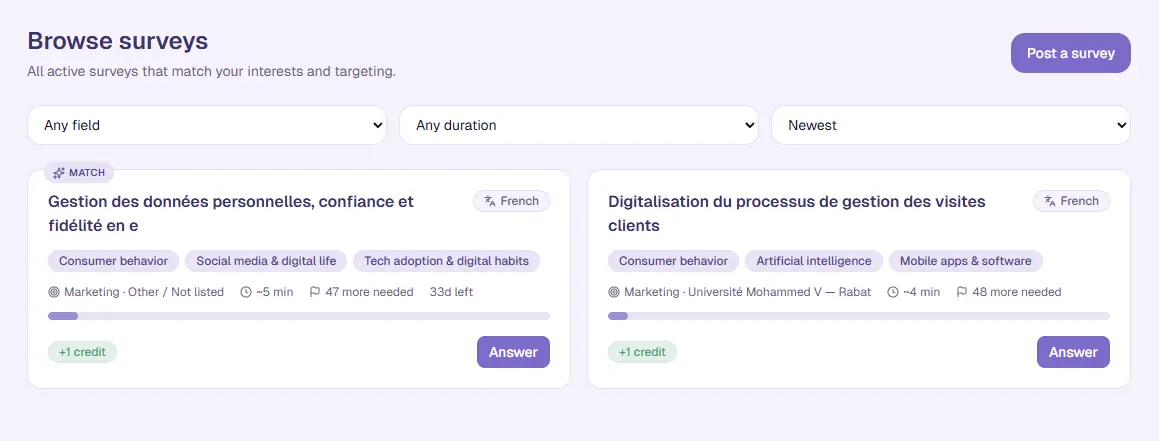
The form embeds inline. There are three steps, in this exact order:
- Answer the form and click Submit on the form's own Submit button. (Spend at least 1:30 on it — the timer pauses if you switch tabs or scroll the form out of view.)
- Copy the validation code from the thank-you screen that appears after you submit. It looks like
EDU-XXXXXX. - Come back to our app and paste the code below the timer.
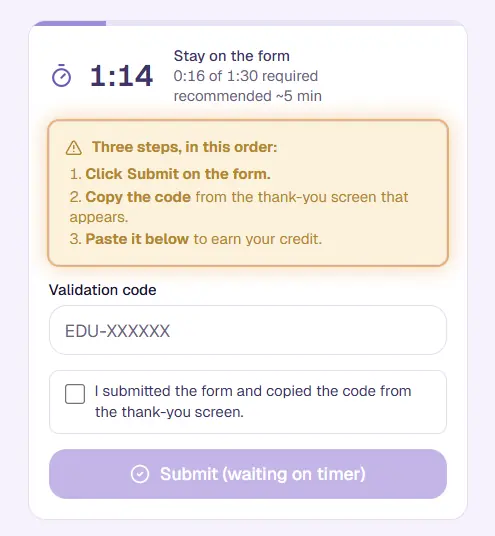
Tick the "I submitted the form" box, paste the code, hit Submit — you earn +1 credit. Done.
What the validation code is
Every survey on Edu Swap has a unique 10-character code, e.g. EDU-TERY2S. The owner pastes it into their form's confirmation message — the thank-you text shown only after someone submits. Responders copy it from that thank-you screen and paste it back in our app.
The code does three things at once:
- Confirms you actually submitted the form — the code is only visible after submit, so getting it requires finishing.
- Confirms the form is actually live and public.
- Gives us a self-policing failure mode — if a lying owner doesn't add the code, responders type the wrong thing, no credits move, and the lying owner gets reported.
The code is your bedrock. Treat it seriously. Owners: paste it exactly. Responders: copy it exactly (case doesn't matter, spaces don't matter, but the letters and digits do).
How to post your own survey
Click Post a survey on the dashboard or in your My surveys list.
You'll fill in:
- Short title (60 chars, shown on cards) and full title (up to 200, shown on the detail page).
- Description — what your project is about, what kind of respondents you need.
- Form platform — Google Forms or Other forms (Typeform, Microsoft Forms, Lovable, custom apps).
- Form URL — must be publicly accessible (anyone with the link, no Google sign-in required).
- Estimated duration — your honest estimate. Responders see this as a recommendation. The actual minimum is always 1:30.
- Responses needed (10–500) and an optional deadline.
- Topics (1–5) and optional targeting (field of study, academic year — soft sort signals; non-matching students can still answer).
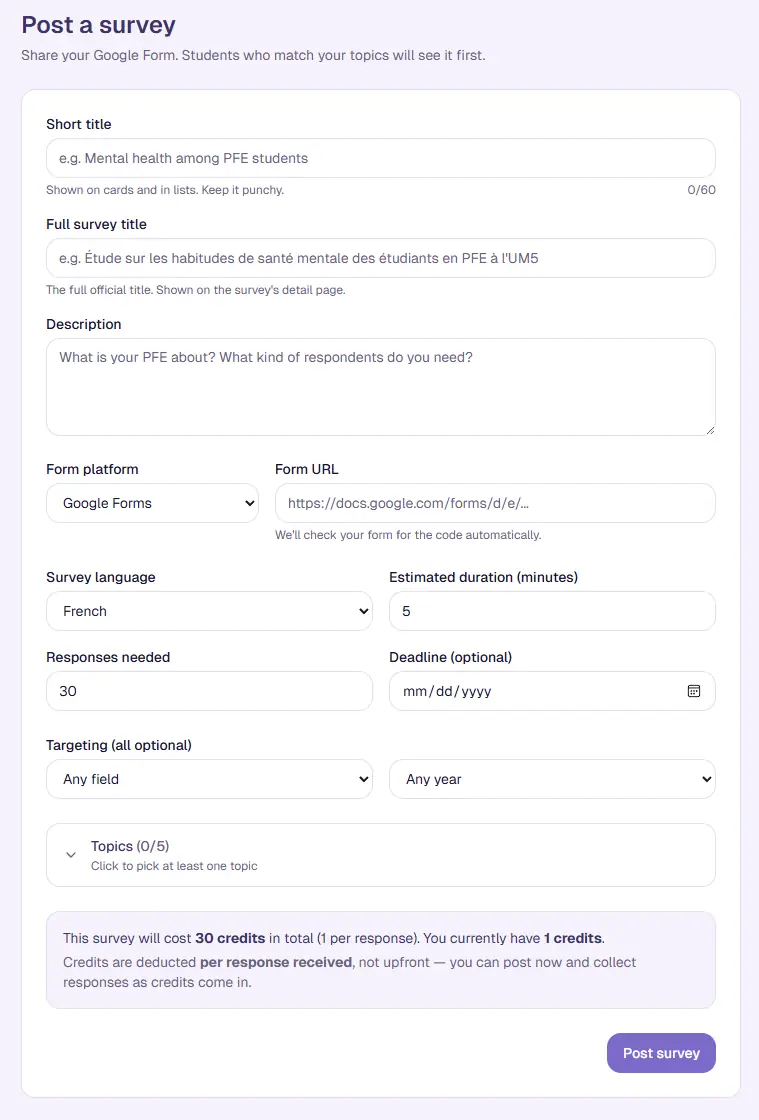
When you submit, your survey's status is Not verified. Two more steps to make it live (see the next section).
How to add the code to your form
On your survey's detail page (My surveys → click the survey) you'll see two steps in red:
Step 1 — Add the validation code to your form
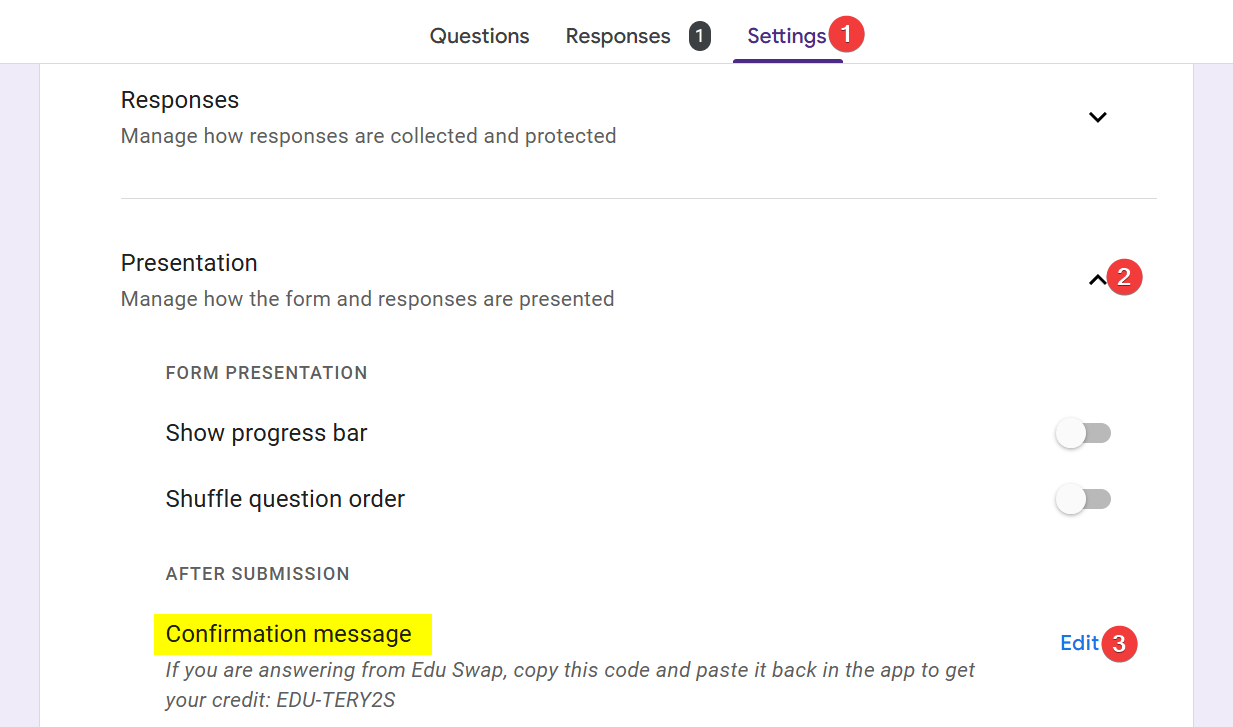
The trick: paste the code into your form's confirmation message — the thank-you text shown after a responder submits. That way the code is only visible to people who actually submitted, and there's no way to copy it without finishing the form.
The validation code card gives you a ready-to-paste line:
For Google Forms:
- Open your form in edit mode.
- Click the Settings tab at the top of the form (next to Questions and Responses).
- Expand Presentation → After submission.
- Click Edit next to Confirmation message and paste the ready-to-use line above.
- Save the form.
For any other platform (Typeform, Microsoft Forms, Lovable, custom app, etc.): set the thank-you / post-submit screen to display the code. The key is that responders only see it after they actually submit — not before.
Step 2 — Verify your form
Click the Verify form button. What happens next depends on your platform:
- Google Forms — we open your form server-side and check that the code is actually there. If we can't find it, we tell you why (form not public, code missing, etc.) and you fix it before trying again.
- Other forms — Typeform, Microsoft Forms, Lovable, custom apps, etc. We can't see inside SPA / JS-rendered forms, so we trust your one-click confirmation. If you confirm without actually adding the code, responders will type the wrong thing, none of your responses will be credited, and you'll be reported.
Once verified, your status flips to Live and responders can find your survey in the feed.
The trust contract — how to lose your account
Most of Edu Swap runs on trust. We don't check every response by hand — we rely on you to be honest because lying gets you reported, and reported users get banned.
You'll lose your account if:
- You confirm you added the validation code to your form when you didn't.
- You copy the code from a survey but never click Submit on the form itself — you took a credit but the owner got nothing.
- You give obviously fake or rushed answers (clicking through, copy-pasting nonsense). The 1:30 minimum catches the worst of this; admin review catches the rest.
- You create duplicate accounts to harvest credits.
- You post spam, scams, or off-topic content.
We'd rather have 100 active honest users than 500 cheaters. Suspended accounts can appeal; banned accounts cannot.